Goblin Monster: A Practical Guide to Using This Creepy Display Font
If you are designing for Halloween, horror-themed events, or simply want to add a touch of macabre charm to your projects, the visual language you choose is critical. Fonts are not just about readability; they are about setting an immediate emotional tone. In this space, Goblin Monster has carved out a niche as a distinctive, eerie typeface that captures attention without relying on generic clichés. However, selecting and implementing such a specialized font requires more than just dragging it into your design software. There are technical nuances and aesthetic considerations that can make or break your final output.
This guide aims to help creators, marketers, and hobbyists navigate the specifics of Goblin Monster. We will look at what makes this font unique, why its encoding matters, and how to avoid common pitfalls that lead to frustrating design experiences. Whether you are a seasoned graphic designer or a small business owner creating flyers for a local haunted house, understanding the mechanics behind the magic is essential for professional results.
Understanding the Appeal of Goblin Monster
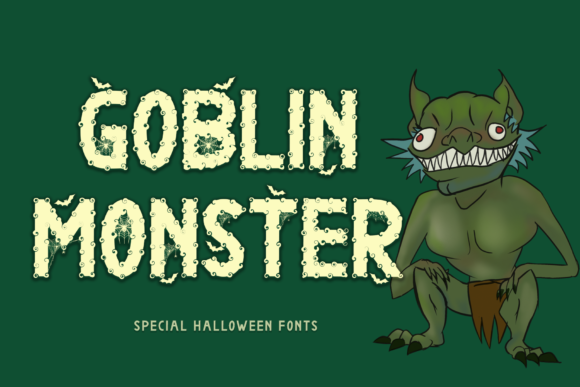
At first glance, Goblin Monster presents itself as a classic horror display font. It features jagged edges, uneven baselines, and a texture that suggests decay or ancient parchment. But its true value lies in its versatility within the "creepy" genre. Unlike some horror fonts that become illegible when scaled up, Goblin Monster maintains a balance between style and function. It works exceptionally well for headlines, posters, t-shirt graphics, and digital banners where impact is prioritized over body text.
The font’s design philosophy leans into the organic and the slightly unsettling. The glyphs often appear hand-carved or scratched, which adds a layer of authenticity that flat, vector-heavy horror fonts lack. For entrepreneurs running seasonal pop-up shops or bloggers writing spooky stories, this font provides an instant atmospheric cue. It tells the viewer, "This is something different," before they even read the content.
Why PUA Encoding Matters
One of the most significant technical advantages of Goblin Monster is its encoding method. It uses Private Use Area (PUA) encoding. To understand why this is important, we must look at how standard fonts work. Standard fonts map characters to specific Unicode code points. If a font designer wants to include special ligatures, alternate glyphs, or decorative symbols, they sometimes run out of space in the standard mapping, leading to compatibility issues across different operating systems and design applications.
PUA encoding solves this by placing these extra glyphs in a reserved section of the Unicode standard that is not assigned to any official character. This allows the font creator to pack the file with hundreds of unique symbols, ornaments, and alternate letterforms without worrying about conflicts with standard keyboard inputs. For you, the user, this means access to a vast library of design elements directly through your font panel or glyph window. You are not limited to typing "Halloween"; you can insert a standalone pumpkin icon, a dripping blood effect, or a decorative border that matches the font's aesthetic perfectly.
Common Mistakes When Using Specialty Horror Fonts
Even with a powerful tool like Goblin Monster, designers often stumble due to overlooked details. Recognizing these errors early can save you hours of frustration and ensure your project looks polished rather than amateurish.
- Ignoring Legibility Hierarchy: The biggest mistake is using Goblin Monster for long paragraphs of body text. Its irregular shapes and high contrast are designed for display sizes—typically 48pt and above. Using it for smaller text creates visual fatigue and confuses readers. Always reserve this font for headlines, titles, or short phrases.
- Neglecting Color Contrast: Because Goblin Monster has intricate details and potential gaps in the letterforms, low-contrast color combinations can cause the text to disappear. Placing light gray text on a white background, for example, will wash out the texture. High contrast is non-negotiable for this typeface.
- Overlooking Kerning and Tracking: Display fonts often require manual adjustment. The default spacing might feel too tight or too loose because the irregular shapes do not always align predictably. Failing to adjust kerning can make words look cramped or disjointed, undermining the professional quality of your design.
- Misusing Ligatures: While the PUA encoding offers many ligatures, not every combination looks good. Some designers blindly apply every available alternation, resulting in a cluttered and chaotic appearance. Select ligatures purposefully to enhance specific words, rather than applying them uniformly.
Practical Advice for Implementation
To get the best results from Goblin Monster, you need a strategic approach. Here are several actionable steps to improve your workflow and final output.
1. Test Before You Commit
Before finalizing a layout, create a test document. Place your headline in Goblin Monster and view it at actual size. Zoom in to check for pixelation if you are working digitally, or print a small sample if you are preparing for physical production. This step helps you identify any rendering issues that might occur on different devices or printers. It also allows you to verify that the specific ligatures you intend to use are accessible in your chosen software.
2. Pair Wisely
A strong display font needs a supportive partner. Avoid pairing Goblin Monster with other ornate or busy fonts. Instead, opt for clean, simple sans-serif or serif fonts for subheadings and body copy. This contrast highlights the personality of Goblin Monster while maintaining readability. For instance, a bold, clean sans-serif like Helvetica or Arial can provide a stable foundation that lets the goblin-style title stand out as the focal point.
3. Leverage the Glyph Panel
Spend time exploring the full range of glyphs available in the font. Open the glyph panel in your design application and browse through the alternatives. You might find a specific 'G' or 'O' that better suits your composition, or perhaps a decorative element that replaces a bullet point in a list. These small details contribute significantly to the overall cohesion of your design. Remember, the PUA encoding gives you these options; using them demonstrates a higher level of design intent.
4. Consider Background Texture
Goblin Monster shines when placed on textured backgrounds. Think aged paper, dark wood, stone, or subtle grunge overlays. The font’s rough edges complement these textures, making the text feel integrated into the environment rather than pasted on top. However, ensure the background does not compete with the text. Use opacity adjustments or drop shadows sparingly to maintain separation and legibility.
Evaluating Your Choices
When deciding whether Goblin Monster is right for your project, ask yourself a few key questions. Does the project require a sense of fun, spookiness, or antiquity? Is the audience expecting a playful or eerie tone? If the answer is yes, this font is likely a strong candidate. However, if you are designing for a corporate event, a medical clinic, or a formal invitation, the font may send the wrong message.
Additionally, consider the medium. Digital screens can sometimes struggle with the fine details of complex fonts, especially on lower-resolution displays. Print media generally handles intricate typography better, but ink bleed can still obscure delicate parts of the letters. Always adapt your expectations based on the final output method.
Final Thoughts
Goblin Monster is more than just a spooky decoration; it is a versatile tool for effective communication when used correctly. By understanding its PUA encoding benefits, avoiding common typographic errors, and pairing it thoughtfully with other design elements, you can create compelling visuals that resonate with your audience. Take the time to explore its features, test your layouts thoroughly, and let the font’s unique character enhance your creative vision. With careful application, this font can transform ordinary designs into memorable experiences.